As mentioned in the Completion Time and Completion Rate articles, the questions and elements you use in your survey can have a significant impact on your overall survey health.
To help you design a healthy survey, a question analysis and rating is provided on the Health tab.
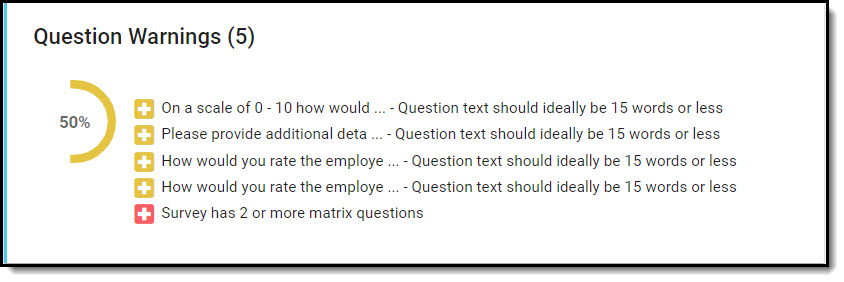
0 Question Warnings? Well, it just doesn't get any better than that!
1 - 5 Question Warnings? Check out the suggestions we've provided and determine if you can make changes to reduce the number of warnings.
6+ Question Warnings? It happens... but you really should consider making some changes. Depending on the type of survey you have (e.g. Employee Engagement) this might be necessary, but for others (e.g. Customer Satisfaction), you might be making things a bit too cumbersome for the respondent.
Here are some things to consider when designing your surveys that will help you to keep those warnings to a minimum:
Matrix Questions
- Matrix questions are not recommended in surveys as they provide customers with the ability to straight-line their answers to complete the survey quickly (e.g. responding with the same response to all sub-questions).
- Best practice is to collapse your matrix question into one or two clear, multiple choice or scale questions; often the questions can be combined as they are not vastly different.
- If you are using a matrix, use just one and ensure the items you are evaluating are distinct from each other so that users have to read and think about each sub-question.
- Matrix questions are not ideal for mobile distribution.
Text Areas, Video Input, and Audio Input
- At most, you should include just one descriptive content input in the survey.
- If more are included, they should be hidden using logic and only displayed when absolutely necessary.
- These types of questions/elements should be optional, so users are not inclined to provide low quality responses.
- Turn sentiment analysis on to receive insights into the data without having to review every response.
- When using video or audio inputs, provide the option for users to type their response to support alternative input formats.
- The best use of these question/element types is for gathering general comments to support NPS, CES, or Overall Satisfaction (KPI) questions.
Display Video
- We recommend that any embedded marketing or instructional videos are under 30 seconds in length to provide the optimal experience for your customers.
- More than 80% of people will watch the full video when it is 30 seconds or less.
- 66% of people will watch the full video if it is 2 minutes or less.
Display Text
- Consider how long it takes for a user to read the text.
- Make your text interactive and fun, so that users feel like they are a part of the bigger picture and engaged in the survey.
- User our WYSIWYG editor to format your text and make it readable for the customer.
- There are two relevant topics that might be included in the introduction of a survey; they are:
- The purpose of the survey (maximum of two sentences, each consisting of 15 words max).
- How the survey results will be used to improve customer experience, etc. (maximum of two sentences, each consisting of 15 words max).
- If you are including informational text mid-survey, it should be no more than one sentence (15 words max) per instance.
Be sure to review our other articles about survey health for more recommendations & best practices!